Don’t like the image? Pick another one from your own photos, stock photos or an AI image. (4 steps, about 1 min)
STEP 1
Open the article
In the Articles menu, click Edit in the article’s row to open the editor.
The Articles list: the Edit button in the article’s row
STEP 2
Click Replace
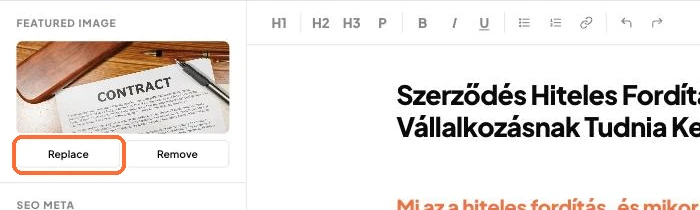
In the editor’s left sidebar, under Featured Image, click Replace.
The Featured Image panel with the Replace button
STEP 3
Choose an image
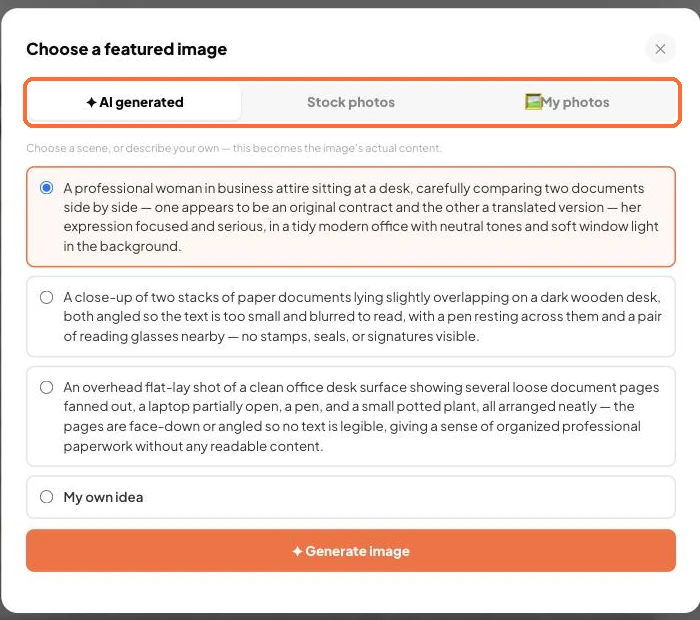
You can choose from three tabs: AI generated (pick a scene, or describe what the image should show in the My own idea field, then generate the image), Stock photos, or My photos.
The Choose a featured image window
STEP 4
Save
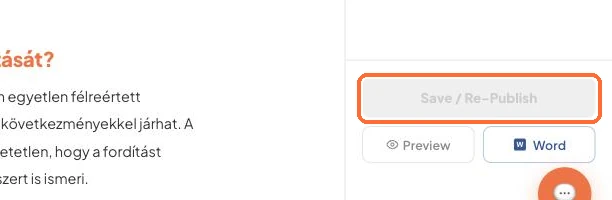
The new image replaces the Featured Image. Save the article with the Save button at the bottom right.
The Save button at the bottom right of the editor
Good to know:
Don’t want an image? Use the Remove button, or switch off Include image under the Publishing settings.
You can upload your own photos in advance in Settings, on the Your own photos card.
✓ Done!
Didn't work, or stuck?Ask the Blost AI assistant (bottom right corner), or write to us: info@blost.ai