Need 2–3 articles a week, not one a day? Choose the days of the week when articles are created and published. (5 steps, about 1 min)
STEP 1
Open Settings
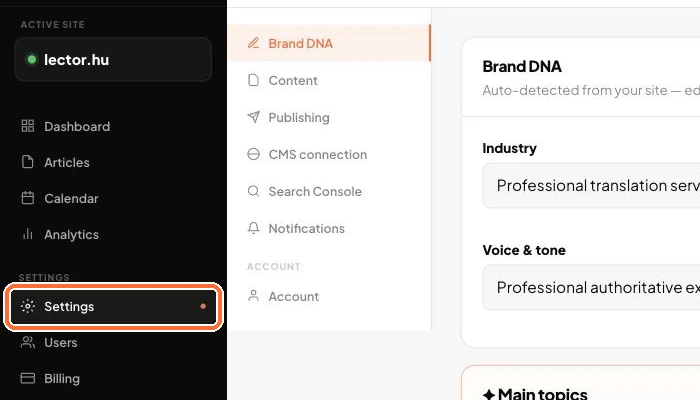
In the left menu, click Settings.
The left menu with Settings selected
STEP 2
Choose the Publishing tab
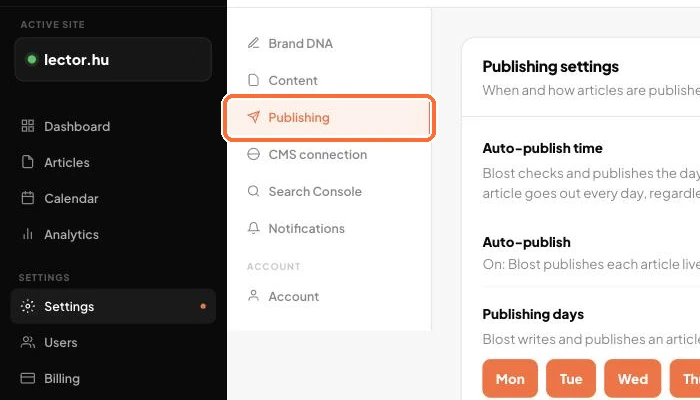
On the Settings page, pick Publishing in the list on the left.
The settings list with Publishing selected
STEP 3
Pick the days
In the Publishing days row, click the days when you want articles. Selected days turn orange. For a quick choice, use the preset buttons: Every day, Weekdays, 3 a week (Mon–Wed–Fri), 2 a week (Tue–Thu). Select at least one day.
The Publishing days row with Mon, Wed, Fri selected and the preset buttons next to it
STEP 4
Save
Click the Save changes button.
The Save changes button
STEP 5
Check the Calendar
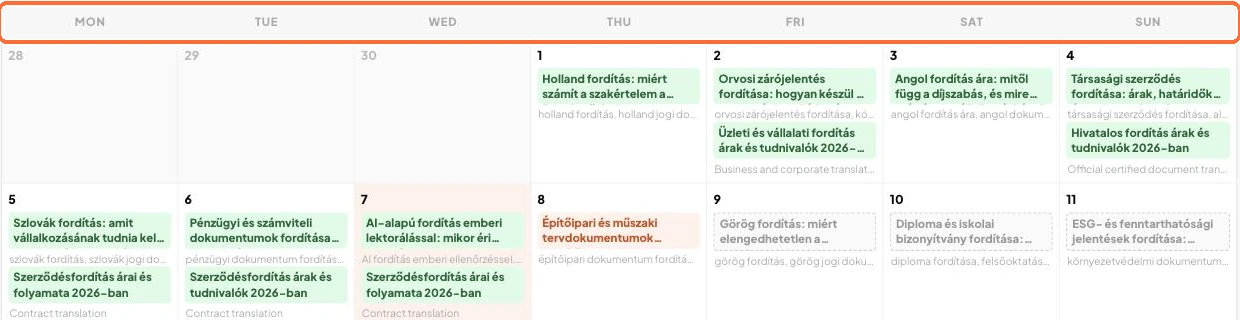
In the Calendar, selected days get an orange stripe and a “publish” badge. The other days stay grey. In the List view, each article shows whether it falls on a publishing day.
The Calendar view with days and articles
Good to know:
Articles that are already scheduled go out on the next selected day.
Articles planned for days you did not select are not created. You can move the date of planned entries (dashed border) in the Calendar.
On the Starter plan, at most one article is created per day. The monthly article limit depends on your plan.
✓ Done!
Didn't work, or stuck?Ask the Blost AI assistant (bottom right corner), or write to us: info@blost.ai